
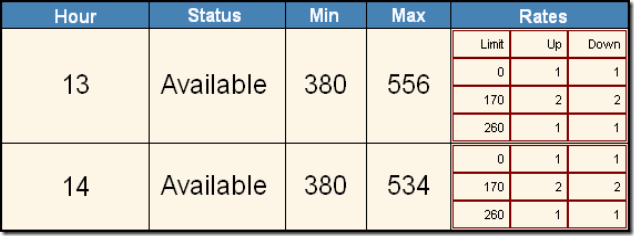
I needed to display some parent data with its child data on the same row as shown in the image above. I happen to be combining a few tables together into a new table (called dtPlan) and then binding the GridView to that new table. So this was my approach while moving the data into the dtPlan table. dtRampRates is the child table of the data in dtResults.
DataView dvRampRates = new DataView(dtRampRates);
dvRampRates.Sort = "parentId, id";
StringBuilder sb = new StringBuilder();

for (int indexRow = 0; indexRow < dtResults.Rows.Count; indexRow++)
{
    DataRow drPlan = dtPlan.NewRow();
    drPlan["c0"] = planHour;
    drPlan["c1"] = dtResults.Rows[indexRow]["ResourceStatus"].ToString();
    drPlan["c2"] = dtResults.Rows[indexRow]["MinEconomicMW"].ToString();
    drPlan["c3"] = dtResults.Rows[indexRow]["MaxEconomicMW"].ToString();

    dvRampRates.RowFilter = "parentId=" + dtResults.Rows[indexRow]["id"].ToString();

    sb.Length = 0;
    sb.Append("<table cellspacing='0' class='RampRate'>");

    if (indexRow == 0)
        sb.Append("<tr><td>Limit</td><td>Up</td><td>Down</td></tr>");

    for (int i = 0; i < dvRampRates.Count; i++)
    {
        sb.Append("<tr><td>");
        sb.Append(dvRampRates[i]["breakpointLimit"].ToString());
        sb.Append("</td>");
        sb.Append("<td>");
        sb.Append(dvRampRates[i]["rampRateUp"].ToString());
        sb.Append("</td>");
        sb.Append("<td>");
        sb.Append(dvRampRates[i]["rampRateDown"].ToString());

        sb.Append("</td></tr>");
    }

    sb.Append("</table>");
    drPlan["c4"] = sb.ToString();
    dtPlan.Rows.Add(drPlan);
}

gvPlan.DataSource = dtPlan;
gvPlan.DataBind();
The child grid is made in the “for” loop. Normally, you would have this loop in the RowDataBound event for the GridView. With that approach, it is easy to see how most of the code would be the same.